We've moved! Visit
The Keyword
for small business news, stories and resources.
Small Business
Tips and tricks for managing your business with Google’s solutions
Across the U.S., businesses are using the web to grow
Wednesday, May 10, 2017
When their 10-year-old daughter asked if she could raise alpacas on the family ranch, Jim and Kelley Hobart figured, “Why not?” They welcomed the animals onto their land and soon thereafter discovered the many benefits of alpaca wool. It was soft, durable, warm and eco-friendly
—it had to be shared with the rest of the world. To the delight of their daughter and alpaca lovers everywhere, the Hobarts launched
Alpaca Direct
in 2005, producing quality yarns and apparel made from the unique fiber.
Jim and Kelley never imagined that a curious request from their youngest daughter would transform into a full-fledged business, or that a small storefront in Hayden, ID, would become a popular travel destination for knitting enthusiasts worldwide. Yet today Alpaca Direct is at the heart of a vibrant and global knitting community. With the help of the web, they’ve brought the warmth of alpaca wool to more than 100,000 customers across 30 countries. As Kelley says, “With Google tools, we can do that, and [customers] can be part of our community.”
In 2016, Google’s search and advertising tools helped provide $222 billion of economic activity for 1.5 million businesses, website publishers, and nonprofits across the U.S. Our
2016 Economic Impact Report
explores that economic impact state-by-state and the local businesses that are helping to drive it.
While working on a small leather goods line in New York City, Tanya Menendez and Matthew Burnett realized how difficult it was to find local manufacturers. In an effort to democratize that access, the two started
Maker’s Row
, an online marketplace that helps small businesses find American factories to make their products. They use AdWords to both establish factory partnerships and find new customers, and YouTube to, as Tanya describes, “put a face behind the products that are made in the United States.” In five years, the company has helped 120,000 small businesses source and create products in 11,000 American factories.
After serving as a U.S. Marine for six years, Nick Baucom founded a company,
Two Marines Moving
, in Alexandria, Virginia. His goal was to keep his fellow veterans gainfully employed, while giving local residents a moving option they could trust. Today, Two Marines Moving employs more than 100 veterans. They use Search and AdWords not only to find customers, but also to recruit employees. Nick has opened a second location in Florida and hopes to create job opportunities for 500 veterans in the next five years, vowing that “veterans will always have a home here.”
Across the U.S., businesses large and small are using the web to find their customers, grow, and make an impact.
We’re proud to be part of their
stories
.
Posted by Claire Mudd, Director, Americas Small Business Marketing
Track what matters to you easily in AdWords Express
Monday, May 9, 2016
If you own a small business, a visit to your website is only the first step to getting more customers. Whether they subscribe to your newsletter, make an online purchase, or click to email you directly, the next step a customer takes on your website is an important indicator of how you’re doing online. However, setting up tracking for the things you care about can be complex, especially for business owners with little time to spare.
That’s why we’ve introduced a new feature for tracking these goals in AdWords Express. AdWords Express advertisers can now access the power of Google Analytics right from their campaign dashboard. Connect a current Analytics account or set up a new one in minutes right from the AdWords Express dashboard. Once you set the goals for your website, you’ll be able to see how customers who click on your ad go on to interact with your website.
Analytics will show you how your ad is contributing to the website goals that matter to you
Google Analytics has been an invaluable resource for small business owners looking to understand these key interactions. For Carrie Sullivan, co-owner of Telaya Wine Co. in Idaho, understanding how visitors interact with her website has been key to her company’s success online. “Being a small business, we wear many different hats and we have a small staff, so we don’t have someone to just focus on our website. Google Analytics does that for us.”
With the introduction of this feature, we’re excited to bring all these benefits to AdWords Express advertisers. Take your performance to the next level by understanding how your online spending impacts the website goals you care about at
google.com/adwords/express
, or visit our
help center
to learn more.
Posted by Zhouzhou He, AdWords Express Product Manager
Learn how Google can help your business with our new Help Desk Hangouts on Air series
Monday, March 19, 2012
You’re looking to grow your business, and we offer a ton of tools to help you do just that. But sometimes, you need a little help learning all the options and getting started. That’s why this week on the
Google+ Your Business page
, we’ve launched a new series of Help Desk Hangouts On Air to put you in touch with teams who can help you get the most out of our products and features.
What’s a
Hangout On Air
? Well, Hangouts are a video group chat with a limit of 10 participants. Hangouts On Air are special Hangouts that allow you to broadcast that 10-person Hangout to many people and record it for future viewing.
To kick things off, we asked
Justin Cutroni
of the
Google Analytics
team (and author of the blog
Analytics Talk
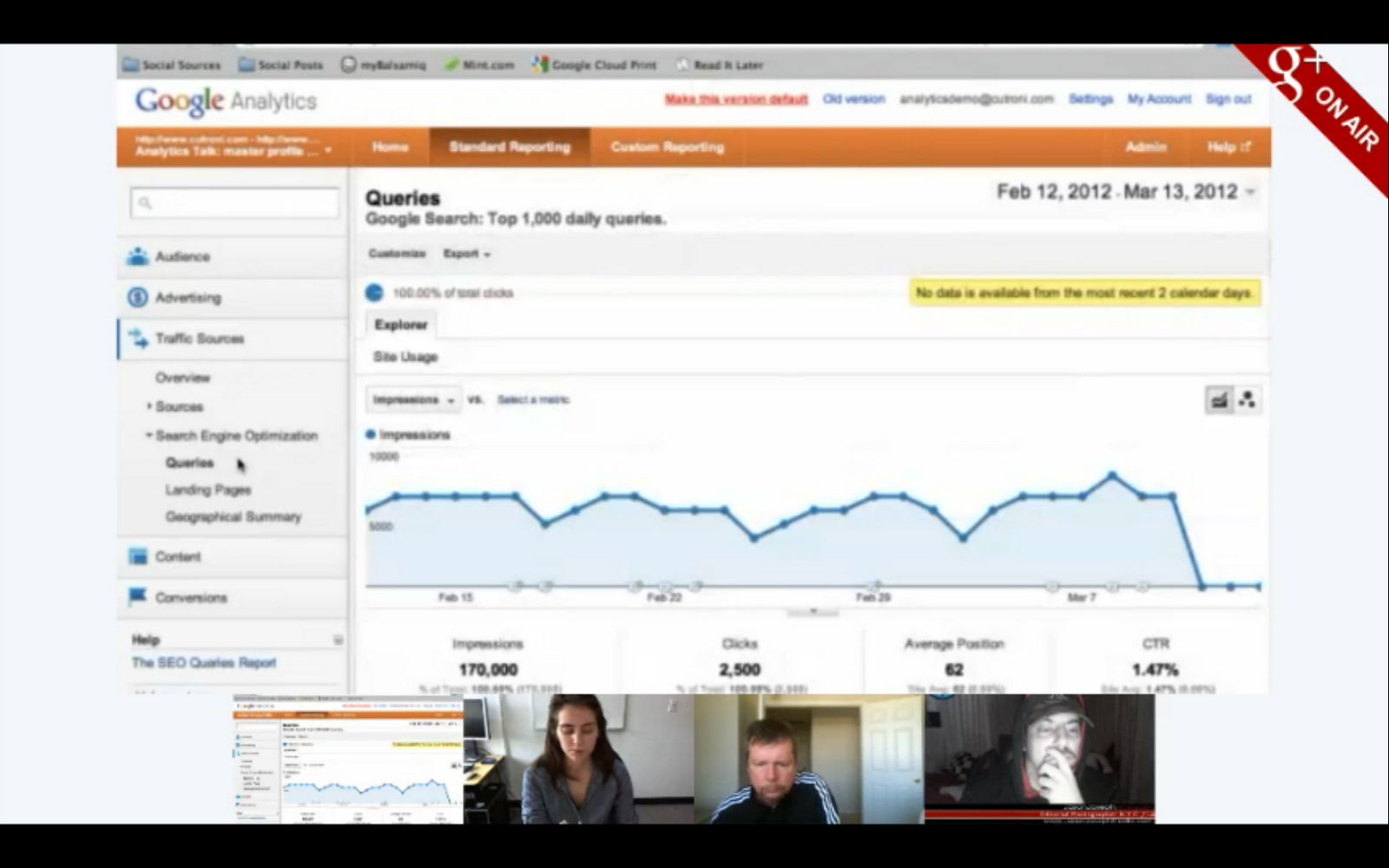
) to show us how business owners can use Analytics to track their advertising campaigns, website performance and see how users are getting to their site (e-mail, social media, referrals). If you missed it, you can watch the full hour-long Hangout on the Google Business YouTube channel:
Here’s how the video breaks down:
Intros - Hi, Mom! (2 mins)
The basics (25 mins)
What is Analytics?
Why, as a business owner, should I use Analytics?
How do I get started?
How do I read the reporting information? (Here Justin walks us through the features of an active account.)
Q&A (25 mins)
Wrapup (2 mins)
Earlier in the week, we asked you to share with us your Analytics questions — and you had plenty! Here are just some of the questions Justin addressed in the Hangout:
Kenneth
: Is there a threat in respect to data privacy?
We take privacy very seriously at Google. The only person that has access to your Google Analytics data is you. You can also grant other people access to your Analytics data, but that’s up to you.
Martynas
: Is there a plan to update the administration part of GA? We need more levels: creator, administrator, manager, reader.
Excellent feature request, and it relates to the question above. We get this question often and know that the current model is limiting. We are working hard to figure out the best user model for Analytics.
Lea
: When oh when will export to PDF be available in the new version of Analytics?
We hear you! It’s coming back very soon. We’re sorry it’s taken so long to add this feature to the new version of Google Analytics.
Jeremy
: What are the plans for integrating Google Analytics with Site Optimizer?
Another great question. For those of you that don’t know,
Website Optimizer
is a website testing tool. You can use it to test different variations of your website, like landing pages or the checkout process. We’ve heard our users loud and clear that Website Optimizer would be a lot more useful as part of Google Analytics. Stay tuned ...
Connie
: Is there a good WordPress plug-in for adding GA code to a blog?
Plug-ins! Justin’s favorite, we learned yesterday in the Hangout. There are some great ones out there, especially for WordPress. Check out
Google Analytics for WordPress
.
Raphael
: Can you tell us more about the benefits of using Analytics for tracking mobile apps?
You can absolutely
track apps with Google Analytics
. We have two SDKs, one for
Android
and one for
iOS
, that make it easy to track how people use an app. If you’re going to use GA to track apps you should also understand
Event Tracking
and
Custom Variables
. These two features are very useful when tracking apps.
Justin shows us a feature that tells you how often you show up in Google’s organic search results and the number of click-throughs that you get.
To learn more about how to get started with Google Analytics, visit our
Help Center
. And remember to tune in to the live stream of our next Hangout at 11 a.m. PDT Wednesday, as we discuss how to use Hangouts (something a bunch of you guys have asked us to talk about!). We’ll be collecting your Hangout questions today on the
Google+ Your Business page
.
Posted by Vanessa Schneider, Google Places community manager
Introducing the Learn with Google Webinar Program
Monday, March 5, 2012
(
Cross-posted on the
Inside AdWords
blog
.)
At Google, one of our goals is to help make the web work for your business. Today weíre introducing the
Learn with Google webinar program
that does just that, by sharing best practices and tips across a variety of products, including search ads, mobile ads, display ads, YouTube and Google Analytics.
Weíre kicking off the program with eight live webinars in March:
March 13 at 10am PDT: 5 Tips to Start Marketing your Business with Video
March 14 at 10am PDT: Introduction to the Google Display Network
March 15 at 10am PDT: GoMo: Mobilize your Site and Maximize your Advertising
March 20 at 10am PDT: Understanding Mobile Ads Across Marketing Objectives
March 21 at 10am PDT: Reaching Your Goals with Google Analytics
March 22 at 10am PDT: GoMo for Publishers
March 27 at 10am PDT: Manage Large AdWords Campaigns with Less Effort
March 28 at 10am PDT: 3 Tips to Get More out of your Video Advertising Campaigns
Check out our new
webinar page
to register for any of the sessions or to access on-demand webinars. Weíll be adding new webinars as theyíre scheduled, so check back regularly for updates. You can also stay up-to-date on the schedule by downloading our
Learn with Google Webinar calendar
to automatically see upcoming webinars in your Google Calendar.
Whether your goal is to engage the right customers at the right time, make better decisions faster, or get the most from your marketing dollars, we hope that youíll use these tips and how-toís to maximize the impact of digital and grow your business. Weíre looking forward to having you join us!
Posted by Erica Tsai, Product Marketing Manager
Now available with Google Apps: Google Analytics
Tuesday, December 7, 2010
[Cross-posted from the
Google Enterprise Blog
]
Editor’s note:
We recently
launched an improvement
that makes over 60 additional Google services available to Google Apps users.
This series
showcases what’s new and how your organization can benefit.
Welcome to Google Analytics
In today’s world, it is increasingly important for organizations to have a presence on the web. But once your organization has invested time and resources in a website, how do you measure the impact of this investment? Where is your traffic coming from and what is it doing when it gets to your site? Which pages on your site are the most engaging and which pages have the most user dropouts? All of these questions can be answered with
Google Analytics
, Google’s enterprise-class web analytics service, which is now available for free with your Google Apps account!
Google Analytics provides data about your web properties, including traffic volume, number of visitors, and time spent on your site, in a straightforward and easy to understand way.
Google Analytics also makes it easy to track where your traffic comes from, both in terms of referring sources as well as geographic location.
Google Analytics is designed to be easy to use for everyone in your organization, from the product manager to the chief of marketing. Even though it’s simple to use, Google Analytics offers advanced features such as custom reports, segmentation, e-commerce capabilities, API access, and onsite search for power users that want to construct a more tailored experience. Google Analytics delivers easily-digestible insights that can be used across your organization to increase website traffic and engagement, and to improve the return on your web investment.
Just like other Google Apps services, Google Analytics runs in Google’s cloud so it delivers all of the world-class reliability and scalability that you have come to expect from Google Apps. Also, sharing Analytics data and delegating access to colleagues in your organization is simple using their existing Google Apps accounts. And, because the documents, spreadsheets and sites that you create using Google Apps live in the cloud and have unique web addresses, you can use Google Analytics to
track traffic to your domain’s docs
in addition to your website.
Learn more and get started
Google Analytics
can be enabled by your domain administrator from the Google Apps Control Panel at
https://www.google.com/a/[your_domain.com]
(replace [your_domain.com] with your actual domain name). If your organization isn’t using Google Apps yet, you can learn more and sign up today at
http://www.google.com/apps/more
.
For more information about how Google Analytics can help you track engagement with your website take a look at our
product tour
or read some
customer stories
to learn how Google Analytics has had an impact on an organization like yours. Or, check out the
Google Analytics blog
for the latest news and tips and tricks.
Share your story
Have you already started using Google Analytics at your organization, or plan to now that it’s available? Please
share your story
and your organization could be
featured in the next Gone Google ad campaign
!
Posted by Jeff Gillis, Google Analytics team
Note: Google Analytics may not be available in all areas.
SMB Week Canada Wrap-Up: What’s a Small Business to Do?
Tuesday, November 2, 2010
Chris O’Neill, Managing Director for Google Canada, recently spoke at the 10th annual Small Business Forum organized by
Enterprise Toronto
. In his address, he highlighted a few essential steps all small businesses and entrepreneurs should be pursuing to grow their business and reach new customers.
So before you get caught up in the hustle and bustle of the holidays, take the opportunity to make sure you’re using every online tool available to you that can help you make the most of this shopping season. There’s no time like the present to engage in these five things:
Establish an Online Presence
: 20 percent of searches on Google are related to location, so it’s important for local businesses to have a presences on the web. A website does not need to be complex to serve its purpose. Creating a user-friendly, well-structured website will also help search engines like Google find and index it easily.
Google Webmaster Tools
provides a free and easy way to make your website more Google-friendly.
Use Free Marketing to Reach Customers
: People search Google.com and Google Maps to find local business, so make sure your customers know where you are and what you’re all about by claiming your free
Google Places
business listing. In addition to sharing your location, phone number and business hours, use Google Places to engage with customers by providing photos, video, coupons, public responses and more. You can also take advantage of free marketing opportunities by posting content to social networking sites, such as
YouTube
.
Know Your Customers
: To understand why some visitors aren’t converting, get website analytics data and learn what potential customers are doing on your site.
Google Analytics
is one of these analytics products, and it’s a free and powerful tool that can help you answer questions about the effectiveness of your content, how engaged your users are with your site, where they abandon your shopping cart and much more. With the right data in your hands, you can make smarter website design decisions and also make sure that the money you spend on advertising is actually delivering the results you want.
Advertise Online
: Online advertising is targeted, measurable and flexible. Products such as
Google AdWords
allow business owners like you to connect with your target audience at the exact moment they search for your products or services online. With AdWords, you only pay when someone clicks on your ad is taken directly to your website. You also get actionable analysis and performance information, so you know how to refine your ad copy or the keywords that trigger your ad to appear on the search results page. Plus, any business can be up and running in 15 minutes.
To find out about all our advertising tools and products, visit our
Google for Advertisers
site for Canadian businesses.
Embrace the Cloud
: Web-based applications, such as
Google Apps
, are helping to streamline productivity and ensure that your business is running efficiently. Your employees can collaborate on documents in real-time and access them from anywhere, whether they’re on the road or at the office. This suite of online products also helps businesses spend less time and money managing email and other IT services, giving them the ability to focus more on what they do best: creating quality products and services, and sharing them with customers. Best of all, you can get started with Google Apps for free!
Posted by Andrew Swartz, Small Business Blog team
Google and SBA Launch “Tools for Online Success” Small Business Partnership
Monday, August 9, 2010
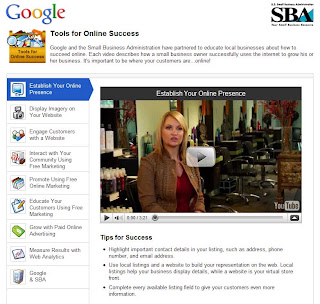
Google and the U.S. Small Business Administration (SBA) recently announced an exciting new partnership aimed at providing resources and tools that can help small businesses learn how to succeed online.
“Tools for Online Success”
is a website featuring videos and tutorials from small business owners who have used the Internet to grow their businesses, and advice from Google’s experts.
You can visit
www.google.com/help/sba
for the full rundown and tutorials, but here are a few easy tips that all small business owners should be employing:
Establish an online presence:
As more and more people get online to find information and local searches grow, an online presence is increasingly important for a small business. Whether it’s creating a website or starting a Twitter feed, there are many steps that you can take to enhance your visibility online. For example,
Google Places
allows you to claim your listing and input specific information about your business. This means that when people look on the Internet to learn more about your business, you are able to build and control the profile they’ll view.
Utilize free marketing tools to reach your consumer base:
Services like Facebook, Twitter and YouTube allow you to communicate with customers and grow your fan base. These tools are great “word-of-mouth” platforms where your customers can tell their friends about your products. Keep customers in-the-loop about new promotions or specials, or exciting events.
Know your customers:
Easy-to-use web analytics tools, such as
Google Analytics
, can help you better understand how your content is being received by customers. You can analyze what search term brought visitors to your webpage and what content they look at while they are there. This information will help you make more intelligent decisions about what products to feature and what terms your might want to run on to trigger your search engine advertisements.
Stay aware of the latest trends:
The recent growing popularity of smart phones has meant that more and more customers search for information on the go. This makes it crucial for your business information to be up-to-date and online. To cater to consumers with smart phones, you can provide driving directions, post digital coupons or link to your menu.
Posted by Posted by John Hanke, Vice President of Product Management
Labels
Brazil
1
Business Photos
2
Chromebooks
1
consumer surveys
1
Economic Impact Report
3
Education
1
English
419
Events
3
Get Your Business Online
7
Gmail
8
GoMo
1
Google Ads
61
Google AdSense
4
Google Analytics
7
Google App Engine
1
Google Apps
60
Google Apps for Work
2
Google Calendar
6
Google Docs
18
Google Domains
3
Google Forms
1
Google Maps
15
google my business
16
Google Offers
1
Google Partners
2
Google Places
45
Google ReWork
1
Google Search
6
Google Shopping
2
Google Sites
7
Google Small Business
20
Google Small Business Blog
419
Google Small Business Community
9
Google Tags
4
Google+
9
Google+ stories
8
Help Desk Hangouts On Air
20
Holiday
3
Learn with Google
4
Livestream
1
Local Services
3
marketing
1
mobile
13
mobile optimization
4
mobile sites
4
Mobile Speed
1
National Small Business Week
3
Newsletter
3
Online security
3
Primer
2
Research
1
reviews
1
Rio de Janeiro
1
Road Trip
1
site design
1
Small Business Saturday
1
Small Business Week
4
Street View
1
TalkBin
2
Test My Site
1
Training
2
Webmaster Academy
2
YouTube
7
Archive
2018
Dec
Oct
Jul
Apr
Feb
Jan
2017
Oct
Aug
Jul
Jun
May
Apr
Mar
2016
Nov
Oct
Aug
Jul
Jun
May
Apr
2015
Dec
Nov
Oct
Sep
Aug
Jun
May
Apr
Mar
Feb
Jan
2014
Dec
Nov
Oct
Sep
Aug
Jul
Jun
May
2013
Nov
Oct
Sep
Aug
Jul
Jun
May
Apr
Mar
Feb
Jan
2012
Dec
Nov
Oct
Sep
Aug
Jul
Jun
May
Apr
Mar
Feb
Jan
2011
Dec
Nov
Oct
Sep
Aug
Jul
Jun
May
Apr
Mar
Feb
Jan
2010
Dec
Nov
Oct
Sep
Aug
Feed
Follow @googlesmallbiz
Follow
Site Feed








 Follow


