We've moved! Visit
The Keyword
for small business news, stories and resources.
Small Business
Tips and tricks for managing your business with Google’s solutions
YouTube’s Promoted Videos picks up steam
Thursday, October 28, 2010
How do you increase sales and build your brand when you’re on a limited budget? You might consider using YouTube’s
Promoted Videos
. YouTube reports that it has served its 500,000,000th Promoted Video view this week and has seen a six-fold increase in clicks it has delivered to businesses such as
Shopper’s Choice
,
Dynomighty
and
Orabrush
. This ad product combines the branding capabilities of video with the direct response action of search advertising, allowing advertisers to promote their videos against search results or related videos on YouTube. For more information on this announcement, please
visit the YouTube blog
for the full story.
Posted by the YouTube Team
Google Media Solutions Series, Part 3: Re-engage your customers while they browse with remarketing and the Google Display Network
Tuesday, October 26, 2010
Welcome to the third installment of the
Google Media Solutions series
. This series has been cross-posted with the
Google Agency blog
, since many of them are applicable to the small business owner. In this post, we will review the
Google Display Network
. The Google Display Network is a large group of websites and blogs that display AdWords ads and allows advertisers to scalably reach their customers at moments of relevance. People are using it for direct response, web engagement as well as driving offline conversions.
We have rolled out many new features for the Google Display Network. One that we would like to highlight is
remarketing
. Google remarketing uses custom technology to reach potential customers who have previously visited your website. Implementing the remarketing tag is very easy; you simply add a pixel to your website. After adding the pixel, you can use remarketing to help capture additional sales or leads by re-targeting users who have already visited the site, and generally convert better and at a lower CPA. To learn more about remarketing and other innovative targeting options on the Google Display Network, you can check out
this post
from the Google Display Network blog series.
We frequently hear some common misconceptions from advertisers about the GDN that we’d like to clarify:
I’ve tried the GDN before - what has changed?:
The Google Display Network has changed a lot in the past few years. Today, the median advertiser gets approximately 20% of their conversions from the GDN at a CPA that is comparable to search.* To drive results like these, we are investing heavily in many new features that make the GDN an effective platform for advertisers with any marketing objective. Examples of features we've introduced over the years include
site exclusions
,
above the fold targeting
,
frequency capping
, and
consolidated view-through conversion reporting
.
The Google Display Network only works for branding:
Contextual targeting and remarketing are just a few examples of great tools that direct response marketers can use to reach potential customers in the later stages of the buying cycle, like consideration and decision. The Conversion Optimizer can also help you generate additional conversions at an attractive cost-per-acquisition (CPA). With powerful tools like these, you can make sure you are capturing all your potential customers as they spend time across the web.
Thanks for reading the third part of the Google Media Solutions blog series. Next, we will discuss how you can use Google TV to drive results for your clients.
Posted by Laura Salzberg, Agency Team
*Internal analysis of North America advertisers advertising on both search and content, with conversion tracking enabled, from Dec. 2007 – Nov. 2008
Advertise your local business with Google Boost
Monday, October 25, 2010
[Cross-posted from the
LatLong Blog
]
As a local business owner in today’s day and age, you know that it’s important to have an online presence because that’s where your customers are. In fact,
research shows
that 97% of people conduct research online before buying locally. Hopefully you’ve gone to
Google Places
to claim your free business listing that appears on Google and Google Maps. That enables you to share accurate information about your business such as your hours of operation, photos and videos - and now you can do even more.
Today, we’re announcing the availability of a new online advertising solution to help local businesses connect with potential customers in their area. Boost enables business owners to easily create online search ads from directly within their Google Places account. No ongoing management is needed after the initial set up, and this beta is currently available to select local businesses in San Francisco, Houston and Chicago.
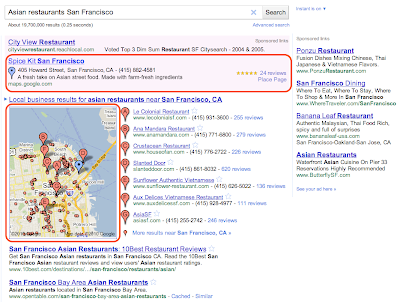
Boost ads are eligible to appear in the “Sponsored Links” section of Google.com and Google Maps search result pages. For example, if you’re a restaurant owner in San Francisco who has signed up for Boost, your ad may show up when someone does a related search like the one below, indicating a cuisine and location that matches yours. Beyond the basics like your company name, address, phone number and website, your ad may also include the number of reviews you’ve received, an average star rating and a link to your
Place page
to help potential customers find additional useful information about your business. When a map appears alongside the results, a blue pin will help folks quickly find your location on the map. Businesses using
Google Tags
will also see their yellow tag appear in the ad.
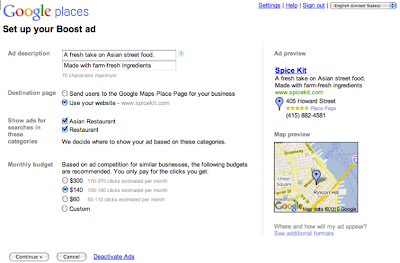
To create your ad, all that is required is a short business description, a web or Place page, your business categories and a monthly budget. From there, our system automatically sets up your ad campaign - figuring out the relevant keywords that will trigger your ad to appear on Google and Google Maps, and how to get the most out of the budget you allotted. You’ll only pay when a potential customer actually clicks on your ad, and you can also view basic ad performance data from your Google Places dashboard.
Here is an example of the simple sign up page within Google Places, which takes just a few minutes to complete. To make the process even easier, the “description” and “categories” fields may be pre-populated with suggestions based on the information you provided on the Place page for your business.
We hope Boost provides busy local business owners with a quick and easy way to share information about themselves with the people who look for them online. Placement in the “Sponsored Links” section of the page will, as always, depend on factors such as your ad’s relevance and quality. Boost does not affect the ranking of the free, organic business listings in any way.
As we do with all beta features, we’ll carefully review the data and effectiveness of this trial and may make changes before making decisions about any future expansion. In the meantime, business owners can
sign in or claim their listing in Google Places
, and select businesses in San Francisco, Houston and Chicago will see an invitation to try Boost in the account dashboard. Interested businesses outside these areas can sign up to receive notification when Boost comes to their area by filling out
this form
.
Posted by Kiley McEvoy, Product Manager
Going Google across the 50 States: Investment advisory firm in Illinois turns to technology to get ahead
Friday, October 22, 2010
[Cross-posted from the
Google Enterprise Blog
]
Editor's note:
Over 3 million businesses have adopted
Google Apps
. Today we’ll hear from Dustin
Bonnema, Portfolio Analyst and IT guru for MainStreet Advisors based in Chicago, Illinois. To learn more about other organizations that have gone Google and share your story, visit
our community map
or test drive life in the cloud with the
Go Google cloud calculator
.
Founded in 2003 by two veteran investment professionals,
MainStreet Advisors
is a Chicago-based Securities and Exchange Commission (SEC) Registered Investment Advisor. We provide investment advisory services, portfolio management, and marketing support for our clients, and are expanding rapidly - we’ve already outgrown our current office space, two years ahead of plan.
Such fast growth prompted us to focus more on technology and find ways to remove communication barriers for all employees. So we switched to Google Apps earlier this year and are already using many of the products in the suite including Gmail, Google Calendar, Google Docs, and Google Sites. We couldn’t be happier with Google Apps, and the best part is that everything is online and all the products are easy to learn and use. We’re trying to put as much as we can into a Google spreadsheet or document.
Shared Google Calendars are used to track time-off, conferences, committee meetings, and individuals’ travel schedules. This is a critical component of our internal communication strategy since Managing Directors and other executives travel as much as 40 - 50% of the year. This same group is reliant on mobile phones, and use either iPhones or BlackBerry devices to access Gmail and other applications, while they’re on the go.
As the company grows, it has become harder to locate and share updated information and policies across all employees. Google Sites is solving this problem – we built an intranet that includes links to shared calendars, client websites, group email aliases, expense reports, gift matching instructions, and investment policies. A Google form is also embedded in the site so employees can submit vacation requests that are updated directly in our HR manager’s spreadsheet. In time, we plan to add even more to the site – we’re already showing gadgets with intra-day performance of market indexes across the world and we’d like to add a map of client locations and charts outlining our company assets over time.
Aside from helping us create more efficient business processes, Google Apps has become a key part of our business continuity plan. We have the security of knowing that if something goes wrong in the Chicago office, we’ll still be able to access our information from other places. This is critical to protecting our clients’ investments, and the future of our business.”
Posted by Dustin Bonnema, MainStreet Advisors
Google Media Solutions Series: Part 2, YouTube - Bring Creative Solutions to Your Clients
Tuesday, October 19, 2010
Over the next four weeks, the Google Agency Blog will be debunking common myths, passing on easy implementation tips, and sharing general how-to of Google advertising. We'll be cross-posting to this blog, since most of the tips are relevant to small businesses. You'll be able to find all the tips in one place under the label '
Google Media Solutions Series
'.
Online video represents a huge opportunity to reach potential customers with new, compelling formats. YouTube is the
perfect platform
to reach these customers, drive sales and enhance branding initiatives.
There are many benefits to advertising on YouTube. It is a unique platform which allow you to reach potential customers who are engaging online. You can set up YouTube campaigns through the AdWords interface. With our new
YouTube Video Targeting Tool
, you can target specific audiences based on interest, demographic or specific video content. You can create a message and share it with consumers with their videos or display ads. Additionally, after running a campaign, you can use
YouTube Insight
to learn how potential customers are interacting with your videos.
There might be some confusion around YouTube ad formats, so here’s some clarification:
I am not sure if my audience is on YouTube?:
Your
audience
is watching YouTube videos. YouTube has users of all ages and 32% of users are between the ages of 35 and 54*. In fact, if the YouTube audience were a country, it would be the 3rd largest country in the world with over 420 million unique visitors every month.
We don’t have video content. How can we use YouTube?:
You don’t need to have video content to advertise on YouTube. You can target your audience on YouTube with display, text or video ads. Our recommendation, since YouTube is a visual medium, is to test out display ads.
Is there professional content on YouTube?:
YouTube has over 3,500 content partners, including
CBS
,
TV Guide
,
Fred
and
JuicyStar07
. Our partners are actively uploading content and the video landscape is constantly changing. As this is the case, your target audiences are returning to see new, updated content on YouTube!
Check in next week for the third post, which will be on the Google Display Network, Remarketing and great tips for reaching your customers while they browse the web!
Posted by Laura Salzberg, Agency Team
* comScore MediaMetrix, September 2009
Google Media Solutions Series: Part 1, Back-to-Basics with Google AdWords and Search Marketing
Monday, October 18, 2010
Over the next four weeks, the Google Agency Blog will be debunking common myths, passing on easy implementation tips, and sharing general how-to of Google advertising. We'll be cross-posting to this blog, since most of the tips are relevant to small businesses. You'll be able to find all the tips in one place under the label '
Google Media Solutions Series
'.
So, let's get started with Google’s search marketing product,
Google AdWords
. Using Google AdWords, you can target Google.com and the
Google Search Network
. This is a great solution to connect with potential customers who are searching for your products and services. It is flexible, measurable, and accountable. With AdWords, you can easily manage the spend of your account and control costs by setting a daily budget and maximum cost-per-click (CPC). Another benefit is that it’s easy to make changes to your ad text, as changes to ads take affect almost instantaneously. Lastly, as an added benefit, you can track the return on investment (ROI) of your account by using
Conversion Tracking
or
Google Analytics
.
There are some common myths that your clients may have heard regarding search and we want to make sure that we clarify these misconceptions:
My website shows organically, so I don’t need to advertise
: It is great to have a highly ranked organic listing; however you can’t control the message to your potential customers with organic listings in the same way that you can control it with search marketing campaigns. By advertising on Google.com and the search network, you can control the message that you share with all potential customers and determine the landing page to which you direct your potential customers after they click on the ad. These features can lead to increased sales.
In addition, organic results are likely only capturing a very small portion of the relevant traffic on Google. For example, a consumer electronics advertiser might appear high in the search results for their brand terms, or specific trademarks relevant to their company, but AdWords can expose their message on a wide variety of related terms like 'digital cameras' 'netbooks' and 'HD TVs'.
Competitors can click on my ads maliciously
: We take the security of AdWords accounts very seriously and have many
resources
in place to prevent your account from accruing invalid clicks. While invalid clicks occur less often than commonly perceived, we have
three filters
in place to protect your account: detection and filtering techniques, advanced monitoring techniques and manual reviews from our team.
Stay tuned for next week’s post on the Google Display Network, remarketing and great tips for reaching your customers while they browse the web!
Posted by Laura Salzberg, Agency Team
Going Google Across the 50 States: Google Apps strikes a chord with Premier Guitar in Iowa
Friday, October 15, 2010
[Cross-posted from the
Google Enterprise Blog
]
Editor’s note:
Over 3 million businesses have adopted
Google Apps
. Today we’ll hear from Patti Sprague, Managing Director of Premier Guitar in Iowa. To learn more about other organizations that have gone Google and share your story, visit
our community map
or test drive life in the cloud with the
Go Google cloud calculator
.
Premier Guitar
is for true guitar enthusiasts, a magazine focused on guitar gear and the musicians who use it. All of our employees are passionate about music, and many play guitar or other instruments. Working with a bunch of musicians creates a fun, creative workplace, but not always a very structured environment. We needed an email system that didn’t tie our team to the office, but allowed us to work together and stay connected wherever we may be. Google Apps was the perfect solution.
In our business we have very tight deadlines. We do things a little differently than other traditional magazines. We not only publish a print version of our magazine, we make all of our content, current and archival, freely accessible over 5 different platforms. We’re able to successfully compete with some of the older print centric publications out there because we’re lean and we can get stories up quickly. That requires a lot of team work. Google Docs allows us to work on a story from wherever we are and get it published quickly. It would never be possible to work as efficiently or collectively if we had to wait for a new version of a document to be sent to us before we could publish.
Often our writers and photographers will need to drop everything to hop on a plane for a last minute factory tour, or an interview with an artist. One of the reasons we started using Google Apps is the ability to access our email and calendars on our mobile phones or anywhere with an internet connection. With Google Apps, we know where the team is and what’s due based on our shared calendars. Our company calendar and editorial calendars are kept up to date so we can get our stories out quickly. Plus, we can always just hop on Chat to ask each other questions or find out the status of a shoot or a photo shoot or piece. Being able to just ask a co-worker a quick question instead of sending them an email and waiting for a response has really helped keep projects moving along.
Apps helps us stay connected and work together, while still having fun doing what we love. For a lean team that wants to meet deadlines while writing about their passion, Google Apps was the perfect choice.
Posted by Ashley Chandler, Google Apps Team
Labels
Brazil
1
Business Photos
2
Chromebooks
1
consumer surveys
1
Economic Impact Report
3
Education
1
English
419
Events
3
Get Your Business Online
7
Gmail
8
GoMo
1
Google Ads
61
Google AdSense
4
Google Analytics
7
Google App Engine
1
Google Apps
60
Google Apps for Work
2
Google Calendar
6
Google Docs
18
Google Domains
3
Google Forms
1
Google Maps
15
google my business
16
Google Offers
1
Google Partners
2
Google Places
45
Google ReWork
1
Google Search
6
Google Shopping
2
Google Sites
7
Google Small Business
20
Google Small Business Blog
419
Google Small Business Community
9
Google Tags
4
Google+
9
Google+ stories
8
Help Desk Hangouts On Air
20
Holiday
3
Learn with Google
4
Livestream
1
Local Services
3
marketing
1
mobile
13
mobile optimization
4
mobile sites
4
Mobile Speed
1
National Small Business Week
3
Newsletter
3
Online security
3
Primer
2
Research
1
reviews
1
Rio de Janeiro
1
Road Trip
1
site design
1
Small Business Saturday
1
Small Business Week
4
Street View
1
TalkBin
2
Test My Site
1
Training
2
Webmaster Academy
2
YouTube
7
Archive
2018
Dec
Oct
Jul
Apr
Feb
Jan
2017
Oct
Aug
Jul
Jun
May
Apr
Mar
2016
Nov
Oct
Aug
Jul
Jun
May
Apr
2015
Dec
Nov
Oct
Sep
Aug
Jun
May
Apr
Mar
Feb
Jan
2014
Dec
Nov
Oct
Sep
Aug
Jul
Jun
May
2013
Nov
Oct
Sep
Aug
Jul
Jun
May
Apr
Mar
Feb
Jan
2012
Dec
Nov
Oct
Sep
Aug
Jul
Jun
May
Apr
Mar
Feb
Jan
2011
Dec
Nov
Oct
Sep
Aug
Jul
Jun
May
Apr
Mar
Feb
Jan
2010
Dec
Nov
Oct
Sep
Aug
Feed
Follow @googlesmallbiz
Follow
Site Feed





 Follow



